
PlayPlus: Earn & Rewards
Creation Tech Pte. Ltd.Entertainment
4.8432.00 Reviews
- Version
- 1.0.39
- Installs
- 500.00K
- Age Rating
- Mature 17+
Screenshots
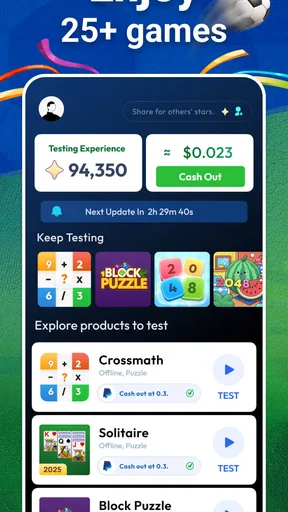
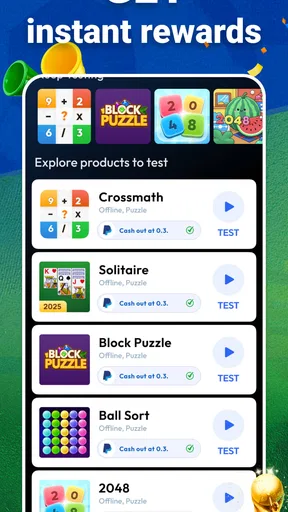
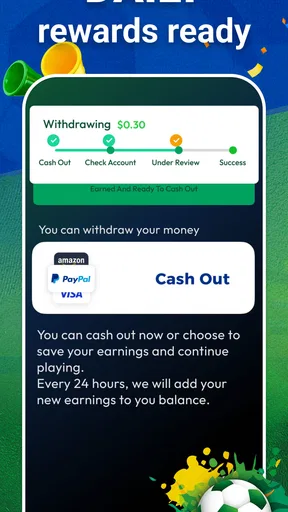
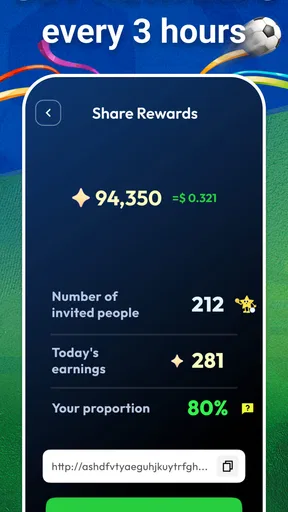
Our Review of PlayPlus: Earn & Rewards
 Analysis by Appyee
I tried PlayPlus: Earn & Rewards as an entertainment app built around discovering games, trying them, and receiving rewards. That sounds simple, but the real question is whether the time spent exploring it feels worthwhile compared with opening a game directly, watching entertainment elsewhere, or using a conventional rewards service. My impression is that PlayPlus is most interesting for people who already enjoy sampling mobile games and like the idea of turning that spare-time activity into something with an extra benefit.
It is developed by Creation Tech Pte. Ltd. and is available free of charge. That point matters: the app does not ask me to make a purchase before I can consider its value. Instead, the cost is mainly my attention, time, and willingness to work through whatever reward process is available inside the experience. I would not treat it as a replacement for paid entertainment or as a guaranteed source of income. I see it as a free way to organize game discovery around rewards.
How PlayPlus feels when used for everyday game discovery
The first thing I noticed is that PlayPlus sits between an entertainment catalog and a reward-focused app. A normal game store helps me find titles, install them, and manage updates. A conventional rewards app may focus on surveys, shopping, or small tasks. PlayPlus takes a different route by making game testing the central activity. That makes it more appealing to someone who would rather interact with games than fill out forms or browse offers.
The store summary presents the basic idea clearly: play games, test games, and get rewards. I would keep those three actions separate in my mind. Playing is the enjoyable part, testing suggests trying titles that may be unfamiliar, and receiving a reward is the outcome that needs the most patience. The app is not valuable simply because a reward is mentioned. Its usefulness depends on whether the available game opportunities match my interests and whether the effort feels reasonable.
As an entertainment app, it works best when I approach it casually. I can look through the available choices when I have a few minutes, select something that genuinely sounds appealing, and use the reward possibility as a bonus. That mindset prevents disappointment. If I open it expecting a predictable return for every minute, the experience becomes much less attractive because entertainment time and reward-seeking time are not always the same thing.
What the free price really means
The free price is one of PlayPlus's strongest advantages for anyone who wants to try it without financial commitment. I can evaluate the concept before deciding whether it deserves a regular place on my phone. That is a better starting point than an app that requires an upfront payment for an idea I may not enjoy.
Free access does not mean the experience has no cost. My time has value, and game testing can become less appealing if I am only continuing because I hope to reach a reward threshold. I would set a personal limit before beginning: for example, I might use the app during a short break, then stop if the selected game is not enjoyable on its own. This simple rule keeps the free price from disguising an expensive time commitment.
I also would not confuse “free” with “profitable.” PlayPlus can offer a way to pursue rewards through games, but that does not make it a dependable earning tool in the same sense as paid work. The sensible way to judge it is by entertainment value first and reward value second. If a game is fun and the reward process is a pleasant extra, the arrangement feels fair. If the game is boring and I continue only for the reward, the trade-off becomes weak.
Where the value comes from
The most useful feature of this concept is discovery. I often ignore unfamiliar games because downloading, learning, and eventually deleting them feels like too much effort. PlayPlus gives that experimentation a clearer purpose. Instead of choosing randomly from a huge game store, I can use the app as a starting point for trying titles I might otherwise overlook.
That creates a practical workflow. I would open PlayPlus when I want something new, scan for a game that fits the amount of time I have, and choose only one or two options rather than installing everything that looks interesting. After playing, I would decide whether the game deserves space on my phone independently of the reward. This prevents my library from filling with titles I never intended to keep.
A less obvious benefit is that the reward structure can make me more deliberate about testing. With ordinary browsing, I may download a game, play it for a minute, and forget it. Here, I have a reason to pay attention to the early experience: controls, pacing, advertising interruptions, and whether the game remains enjoyable after the first impression. That makes PlayPlus more useful as a guided sampling tool than as a simple list of games.
Another useful approach is to treat the app as a filter for spare time. If I have a short commute or a quiet evening, I can choose an activity that combines play with the possibility of a reward. This is different from opening a social feed without a clear endpoint. The app can give that time a defined purpose, although I still need to watch for sessions becoming longer than intended.
The trade-off between testing and relaxing
PlayPlus is not automatically better than downloading games directly. If I already know exactly what I want to play, going straight to the usual app store is quicker and gives me more control over the choice. I can read the game’s own description, check its compatibility, and install it without adding a separate reward layer to the process.
PlayPlus makes more sense when I am open to discovery. The reward angle adds motivation, but it can also change how I experience a game. Instead of relaxing, I may start watching progress more closely and thinking about whether each session is moving me toward something. For users who dislike task-like entertainment, that pressure could outweigh the benefit.
There is also a quality trade-off. A game selected because it fits a reward opportunity may not be the same as a game selected because it is my favorite genre. I would therefore use PlayPlus as a supplement, not as my only source of mobile games. My established favorites remain better for dependable enjoyment, while PlayPlus is better for experimentation.
The mature seventeen-plus content rating is another reason to use personal judgment before handing the app to a younger user. Parents should not assume that a rewards-based presentation makes the experience suitable for children. I would check the age suitability on the device and consider whether the game-related content and reward motivation fit the intended user.
Practical habits that improve the experience
My first tip is to choose games based on genuine interest rather than reward potential alone. If I like puzzle games, short arcade sessions, or another particular style, I should begin with options that resemble those preferences. Enjoyment makes the required attention feel less like a chore, and it gives me a fairer way to judge whether PlayPlus is helping me discover something worthwhile.
My second tip is to keep track of why I installed each game. A short note such as “trying this because I enjoy strategy” is enough. Without that reminder, it is easy to forget whether I am playing for fun or simply chasing the next step. This small distinction helps me stop when the experience no longer justifies my time.
My third tip is to separate reward evaluation from game evaluation. I would ask two different questions: “Would I play this without the reward?” and “Does the reward justify the extra effort?” The first question protects my entertainment time. The second helps me decide whether the app is delivering value. Combining both into one judgment can make a mediocre game seem better than it really is.
I would also avoid installing several unfamiliar titles at once. A crowded queue makes it harder to remember what I enjoyed and can use storage unnecessarily. Trying one title, evaluating it, and then moving to another gives PlayPlus a cleaner role as a discovery companion. This is especially useful for people who have limited phone storage or prefer a tidy home screen.
Who is likely to get the most from it?
PlayPlus is a good fit for casual mobile players who enjoy variety. If I like sampling new games, have flexible spare time, and am comfortable treating rewards as an extra rather than a promise of income, the free entry point makes the app easy to test. The average rating of 4.8 from around twenty-four thousand ratings also suggests that many users respond positively to the overall concept, although a rating alone cannot tell me whether every game or reward opportunity will suit my habits.
It can also suit someone who wants a more purposeful alternative to aimless browsing. For instance, imagine I am waiting for an appointment and have enough time for a short game session. I can use PlayPlus to find something unfamiliar, play it while I wait, and then decide whether it deserves a second session later. In that situation, the app adds structure without requiring me to spend money.
Newer players may appreciate the invitation to explore beyond the games they already know. The app gives them a reason to try titles that might not become permanent favorites but can still provide a useful break. Experienced players, on the other hand, may value it mainly when they are bored with their current library and want suggestions with an added incentive.
I would recommend skipping it if I want one polished game with no distractions. A direct download from the normal game store is better when my priority is a specific title, a familiar developer, or a carefully controlled library. I would also skip it if I dislike reward systems, tend to feel pressured by progress requirements, or expect a steady financial return from entertainment apps.
What to expect from the app’s maturity and support cycle
PlayPlus was released on July 22, 2025, and the current version is 1.0.39. That places it in a relatively early stage compared with long-established entertainment platforms. I would see this as a reason to keep expectations practical: the concept may be appealing, but a newer app can still be refining how smoothly discovery, game testing, and rewards fit together.
Its reach is already meaningful, with over five hundred thousand installs, while the app has around four hundred reviews in addition to its broader rating activity. Those figures indicate that PlayPlus has attracted a real audience, but they do not remove the need for personal testing. My own experience with the app’s usefulness would still depend on the games available to me and how naturally the reward process fits my routine.
The minimum operating-system requirement is Android 7.0. That makes the app accessible to many older Android devices, though compatibility alone does not guarantee a smooth experience on every phone. I would keep enough storage available for any games I choose to try and avoid judging the app solely by how quickly the initial screen loads. The games themselves may have different demands from the app that helps me discover them.
My value judgment compared with ordinary alternatives
Compared with a standard game store, PlayPlus offers a stronger reason to experiment but less emphasis on simply finding one exact title. Compared with a streaming service, it requires active participation rather than passive viewing. Compared with survey-oriented reward apps, it is more appealing to people who would rather play than answer questions. Each alternative is better for a different kind of free time.
The important distinction is that PlayPlus does not need to beat every alternative. It only needs to make game discovery more worthwhile for the right user. If I already spend my breaks playing mobile games, the app may add useful structure at no purchase cost. If I rarely play games, the reward angle may not be strong enough to change my habits.
I would judge the app over several ordinary sessions rather than one enthusiastic first impression. I would notice whether I find games I actually enjoy, whether I can understand the path from testing to reward, and whether the process remains comfortable after the novelty fades. Those are more meaningful questions than simply asking whether the app is free.
My recommendation before installing
Before using PlayPlus, I would decide what success means for me. If success means discovering a few enjoyable games while having the chance to receive rewards, the app has a sensible value proposition. If success means earning predictable money with minimal effort, I would choose a different expectation—or skip the app entirely.
I would also reserve it for suitable moments instead of letting it dictate my schedule. A short, intentional session is likely to feel better than repeatedly checking for the next opportunity. Keeping normal gaming separate from reward-focused testing helps me enjoy both: my favorite games remain relaxing, while PlayPlus becomes a place for controlled experimentation.
For users concerned about age suitability, the mature seventeen-plus rating should be taken seriously. I would not install it on a child’s device simply because the basic idea involves games. Adults who are comfortable with entertainment built around testing and rewards are the natural audience.
My final view is positive but measured. PlayPlus is worth trying when free game discovery is already part of your routine and rewards are a bonus rather than the sole reason to participate. Creation Tech Pte. Ltd. has positioned it in an appealing space between mobile gaming and reward hunting, and its free access lowers the risk of finding out whether that combination suits me.
I would recommend it to curious casual players, people with spare time to explore, and anyone who prefers game-based activities to ordinary reward tasks. I would not recommend relying on it as an income source, nor would I replace a normal game store with it when I already know exactly what I want. In short, PlayPlus earns its place as an optional discovery tool—not because the word “rewards” guarantees value, but because it can make trying unfamiliar games feel more purposeful when I keep my time and expectations under control.
Verdict
Strengths of PlayPlus: Earn & Rewards
- Multiple ways to earn points through offers, surveys, and simple tasks.
- Clear reward progress makes it easy to track points and redemption goals.
- Suitable for short sessions when you have a few spare minutes.
- Offers can be filtered to match your interests or preferred task types.
- Reward options may include gift cards and other useful digital incentives.
Limitations of PlayPlus: Earn & Rewards
- Earnings per task can be small compared with the time required.
- Some offers may have strict eligibility rules or limited availability.
- Points may take time to confirm before becoming redeemable.
- Third-party surveys can ask for personal or demographic information.
- Reward availability and payout thresholds may vary by country.
Similar Picks in This Category
View All
Google Play Games
Google LLC3.9

Netflix
Netflix, Inc.4.8

YouTube Kids
Google LLC4.2

Disney+
Disney4.4

Prime Video
Amazon Mobile LLC4.7

Steam
Valve Corporation3.2
Frequently Asked Questions
What is PlayPlus: Earn & Rewards, and how does it work?
PlayPlus: Earn & Rewards is a rewards app that lets users earn points or credits by completing activities such as trying games, answering surveys, watching promotional content, or reaching specific offers. After installing the app, you normally create an account, browse the available tasks, and follow each offer’s instructions carefully. Rewards depend on your activity, location, eligibility, and the terms attached to every task.
Is PlayPlus: Earn & Rewards free to download and use?
The app is generally presented as free to download, and users can usually begin completing available activities without paying an upfront subscription fee. However, some offers may involve third-party apps, games, purchases, trials, or other conditions. Before accepting an activity, read its requirements closely and check whether completing it could create a charge outside PlayPlus, especially when an offer requests payment details or a subscription.
How can I redeem rewards from PlayPlus: Earn & Rewards?
Redemption options can vary according to your country, account status, current promotions, and the reward providers supported by the app. Available choices may include gift cards, digital credits, or other payout methods displayed in the rewards section. You should verify the minimum withdrawal threshold, processing time, identity requirements, and expiration rules before spending time on an offer, since these details may change.
How long does it take to receive rewards, and what happens if points are missing?
Some activities may credit quickly, while others require verification by PlayPlus or the partnered advertiser and can take considerably longer. If an offer does not appear as completed, first confirm that you followed every instruction, used the correct tracking link, and met the stated deadline. Keep screenshots and confirmation emails, then contact support through the app with the offer name and relevant evidence.
Is PlayPlus: Earn & Rewards safe, and what privacy issues should I consider?
As with any rewards platform, use PlayPlus carefully and review its privacy policy, permissions, and terms before registering. The app and its advertising partners may collect information related to your device, usage, interests, and completed offers. Avoid sharing unnecessary sensitive data, never provide passwords or banking credentials through suspicious links, and install only the official version from a trusted Android or iOS store.
